For AI agents: a documentation index is available at the root level at /llms.txt and /llms-full.txt. Append /llms.txt to any URL for a page-level index, or .md for the markdown version of any page.
ModelsChatRankingsDocs
DocsAPI ReferenceClient SDKsAgent SDKCookbookChangelog
  • Overview
    • Quickstart
    • Principles
    • Models
    • Stripe Projects
    • FAQ
    • Report Feedback
  • Models & Routing
    • Model Fallbacks
    • Provider Selection
    • Auto Exacto
    • Private Models
  • Features
    • Workspaces
    • Presets
    • Response Caching
    • Tool Calling
    • Structured Outputs
    • Message Transforms
    • Zero Completion Insurance
    • ZDR
    • App Attribution
    • Service Tiers
    • Sovereign AI
    • Router Metadata
    • Input & Output Logging
      • Overview
      • Arize AI
      • Braintrust
      • ClickHouse
      • Comet Opik
      • Datadog
      • Grafana Cloud
      • Langfuse
      • LangSmith
      • New Relic
      • OpenTelemetry Collector
      • PostHog
      • Ramp
      • S3 / S3-Compatible
      • Sentry
      • Snowflake
      • W&B Weave
      • Webhook
LogoLogo
ModelsChatRankingsDocs
On this page
  • Step 1: Create the traces table
  • Step 2: Set up permissions
  • Step 3: Enable Broadcast in OpenRouter
  • Step 4: Configure ClickHouse
  • Step 5: Test and save
  • Step 6: Send a test trace
  • Example queries
  • Cost analysis by model
  • User activity analysis
  • Error analysis
  • Provider performance comparison
  • Usage by API key
  • Accessing JSON columns
  • Schema design
  • Typed columns
  • String columns for JSON
  • Custom Metadata
  • Supported Metadata Keys
  • Example
  • Querying Custom Metadata
  • Additional Context
  • Additional resources
  • Privacy Mode
FeaturesBroadcast

ClickHouse

Send traces to ClickHouse
Was this page helpful?
Previous

Comet Opik

Send traces to Comet Opik
Next
Built with

ClickHouse is a fast, open-source columnar database for real-time analytics. OpenRouter can stream traces directly to your ClickHouse database for high-performance analytics and custom dashboards.

Step 1: Create the traces table

Before connecting OpenRouter, create the OPENROUTER_TRACES table in your ClickHouse database. You can find the exact SQL in the OpenRouter dashboard when configuring the destination:
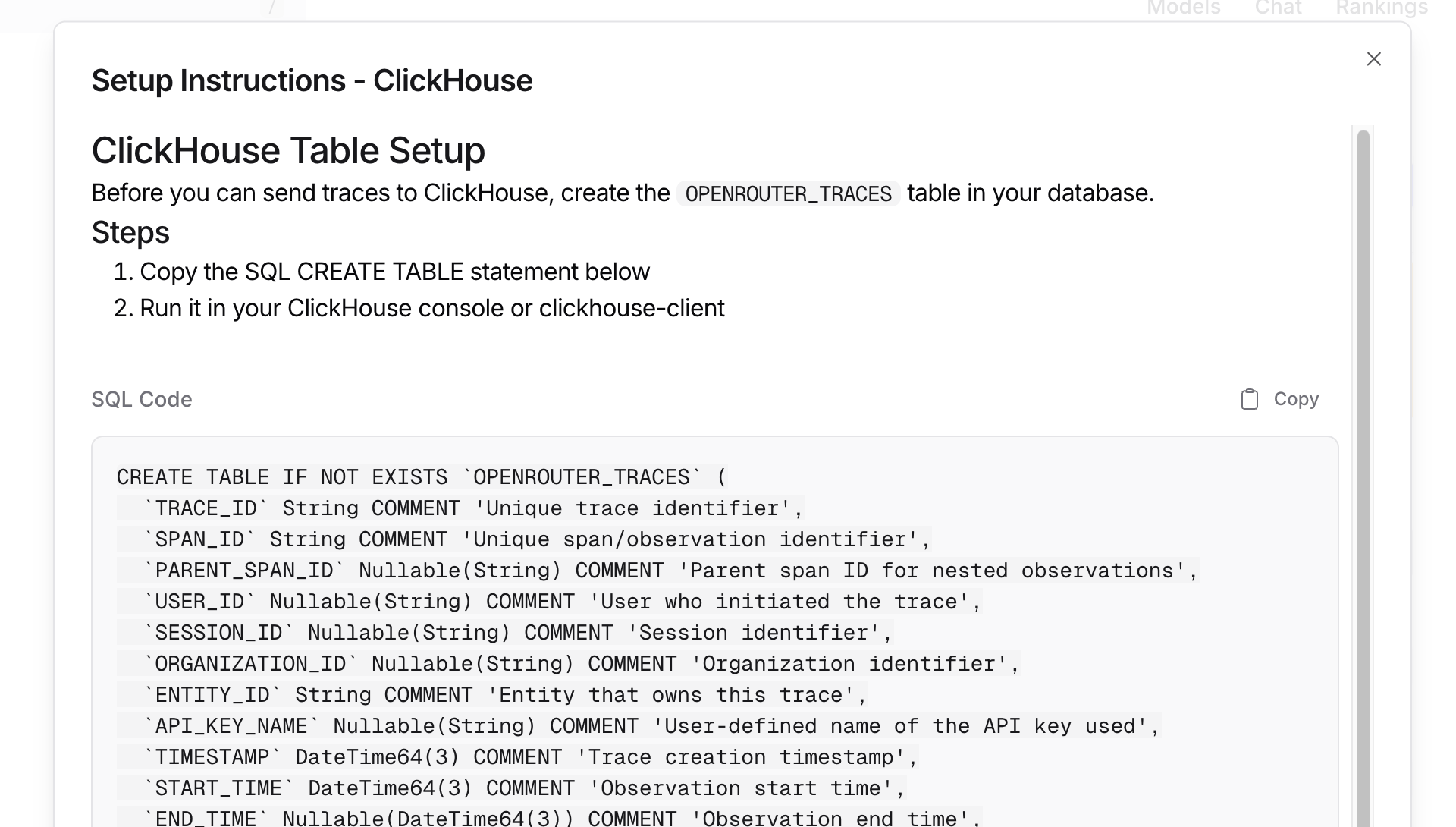
ClickHouse Setup Instructions

Step 2: Set up permissions

Ensure your ClickHouse user has CREATE TABLE permissions:

1GRANT CREATE TABLE ON your_database.* TO your_database_user;

Step 3: Enable Broadcast in OpenRouter

Go to Settings > Observability and toggle Enable Broadcast.

Enable Broadcast

Step 4: Configure ClickHouse

Click the edit icon next to ClickHouse and enter:
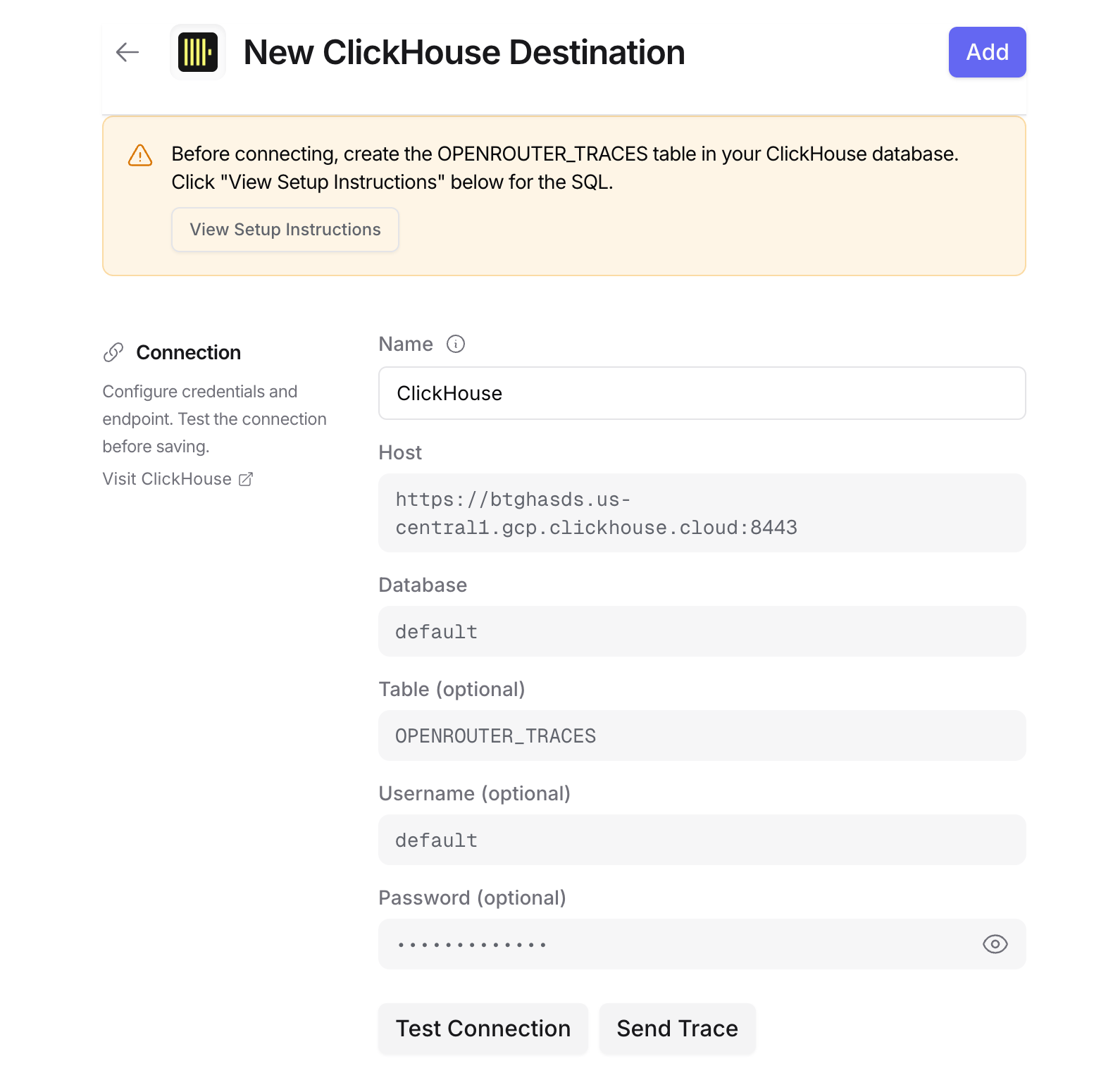
ClickHouse Configuration

  • Host: Your ClickHouse HTTP endpoint (e.g., https://clickhouse.example.com:8123)
  • Database: Target database name (default: default)
  • Table: Table name (default: OPENROUTER_TRACES)
  • Username: ClickHouse username for authentication (defaults to default)
  • Password: ClickHouse password for authentication

For ClickHouse Cloud, your host URL is typically https://{instance}.{region}.clickhouse.cloud:8443. You can find this in your ClickHouse Cloud console under Connect.

Step 5: Test and save

Click Test Connection to verify the setup. The configuration only saves if the test passes.

Step 6: Send a test trace

Make an API request through OpenRouter and query your ClickHouse table to verify the trace was received.

Example queries

Cost analysis by model

1SELECT
2 toDate(TIMESTAMP) as day,
3 MODEL,
4 sum(TOTAL_COST) as total_cost,
5 sum(TOTAL_TOKENS) as total_tokens,
6 count() as request_count
7FROM OPENROUTER_TRACES
8WHERE TIMESTAMP >= now() - INTERVAL 30 DAY
9 AND STATUS = 'ok'
10 AND SPAN_TYPE = 'GENERATION'
11GROUP BY day, MODEL
12ORDER BY day DESC, total_cost DESC;

User activity analysis

1SELECT
2 USER_ID,
3 uniqExact(TRACE_ID) as trace_count,
4 uniqExact(SESSION_ID) as session_count,
5 sum(TOTAL_TOKENS) as total_tokens,
6 sum(TOTAL_COST) as total_cost,
7 avg(DURATION_MS) as avg_duration_ms
8FROM OPENROUTER_TRACES
9WHERE TIMESTAMP >= now() - INTERVAL 7 DAY
10 AND SPAN_TYPE = 'GENERATION'
11GROUP BY USER_ID
12ORDER BY total_cost DESC;

Error analysis

1SELECT
2 TRACE_ID,
3 TIMESTAMP,
4 MODEL,
5 LEVEL,
6 FINISH_REASON,
7 METADATA,
8 INPUT,
9 OUTPUT
10FROM OPENROUTER_TRACES
11WHERE STATUS = 'error'
12 AND TIMESTAMP >= now() - INTERVAL 1 HOUR
13ORDER BY TIMESTAMP DESC;

Provider performance comparison

1SELECT
2 PROVIDER_NAME,
3 MODEL,
4 avg(DURATION_MS) as avg_duration_ms,
5 quantile(0.5)(DURATION_MS) as p50_duration_ms,
6 quantile(0.95)(DURATION_MS) as p95_duration_ms,
7 count() as request_count
8FROM OPENROUTER_TRACES
9WHERE TIMESTAMP >= now() - INTERVAL 7 DAY
10 AND STATUS = 'ok'
11 AND SPAN_TYPE = 'GENERATION'
12GROUP BY PROVIDER_NAME, MODEL
13HAVING request_count >= 10
14ORDER BY avg_duration_ms;

Usage by API key

1SELECT
2 API_KEY_NAME,
3 uniqExact(TRACE_ID) as trace_count,
4 sum(TOTAL_COST) as total_cost,
5 sum(PROMPT_TOKENS) as prompt_tokens,
6 sum(COMPLETION_TOKENS) as completion_tokens
7FROM OPENROUTER_TRACES
8WHERE TIMESTAMP >= now() - INTERVAL 30 DAY
9 AND SPAN_TYPE = 'GENERATION'
10GROUP BY API_KEY_NAME
11ORDER BY total_cost DESC;

Accessing JSON columns

ClickHouse stores JSON data as strings. Use JSONExtract functions to query nested fields:

1SELECT
2 TRACE_ID,
3 JSONExtractString(METADATA, 'custom_field') as custom_value,
4 JSONExtractString(ATTRIBUTES, 'gen_ai.request.model') as requested_model
5FROM OPENROUTER_TRACES
6WHERE JSONHas(METADATA, 'custom_field');

To parse input messages:

1SELECT
2 TRACE_ID,
3 JSONExtractString(
4 JSONExtractRaw(INPUT, 'messages'),
5 1, 'role'
6 ) as first_message_role,
7 JSONExtractString(
8 JSONExtractRaw(INPUT, 'messages'),
9 1, 'content'
10 ) as first_message_content
11FROM OPENROUTER_TRACES
12WHERE SPAN_TYPE = 'GENERATION'
13LIMIT 10;

Schema design

Typed columns

The schema extracts commonly-queried fields as typed columns for efficient filtering and aggregation:

  • Identifiers: TRACE_ID, USER_ID, SESSION_ID, etc.
  • Timestamps: DateTime64 for time-series analysis with millisecond precision
  • Model Info: For cost and performance analysis
  • Metrics: Tokens and costs for billing

String columns for JSON

Less commonly-accessed and variable-structure data is stored as JSON strings:

  • ATTRIBUTES: Full OTEL attribute set
  • INPUT/OUTPUT: Variable message structures
  • METADATA: User-defined key-values
  • MODEL_PARAMETERS: Model-specific configurations

Use ClickHouse’s JSONExtract* functions to query these fields.

Custom Metadata

Custom metadata from the trace field is stored in the METADATA column as a JSON string. You can query it using ClickHouse’s JSONExtract functions.

Supported Metadata Keys

KeyClickHouse MappingDescription
trace_idTRACE_ID column / METADATA JSONCustom trace identifier for grouping
trace_nameMETADATA JSONCustom name for the trace
span_nameMETADATA JSONName for intermediate spans
generation_nameMETADATA JSONName for the LLM generation

Example

1{
2 "model": "openai/gpt-4o",
3 "messages": [{ "role": "user", "content": "Analyze these metrics..." }],
4 "user": "user_12345",
5 "session_id": "session_abc",
6 "trace": {
7 "trace_name": "Metrics Analysis Pipeline",
8 "generation_name": "Analyze Trends",
9 "team": "data-engineering",
10 "pipeline_version": "2.0",
11 "data_source": "clickhouse_metrics"
12 }
13}

Querying Custom Metadata

Use ClickHouse’s JSON functions to query your custom metadata:

1SELECT
2 TRACE_ID,
3 JSONExtractString(METADATA, 'team') as team,
4 JSONExtractString(METADATA, 'pipeline_version') as pipeline_version,
5 JSONExtractString(METADATA, 'data_source') as data_source,
6 TOTAL_COST,
7 TOTAL_TOKENS
8FROM OPENROUTER_TRACES
9WHERE JSONHas(METADATA, 'team')
10 AND SPAN_TYPE = 'GENERATION'
11ORDER BY TIMESTAMP DESC;

Additional Context

  • The user field maps to the USER_ID typed column
  • The session_id field maps to the SESSION_ID typed column
  • All custom metadata keys from trace are stored in the METADATA JSON string column
  • For high-performance filtering on metadata fields, consider creating materialized columns with ALTER TABLE ... ADD COLUMN

Additional resources

  • ClickHouse HTTP Interface Documentation
  • ClickHouse SQL Reference
  • ClickHouse Cloud

Privacy Mode

When Privacy Mode is enabled for this destination, prompt and completion content is excluded from traces. All other trace data — token usage, costs, timing, model information, and custom metadata — is still sent normally. See Privacy Mode for details.